SLA windows
Report uptime over the 7, 30, and 90-day windows that show recent health and longer-term reliability.
Client uptime reports
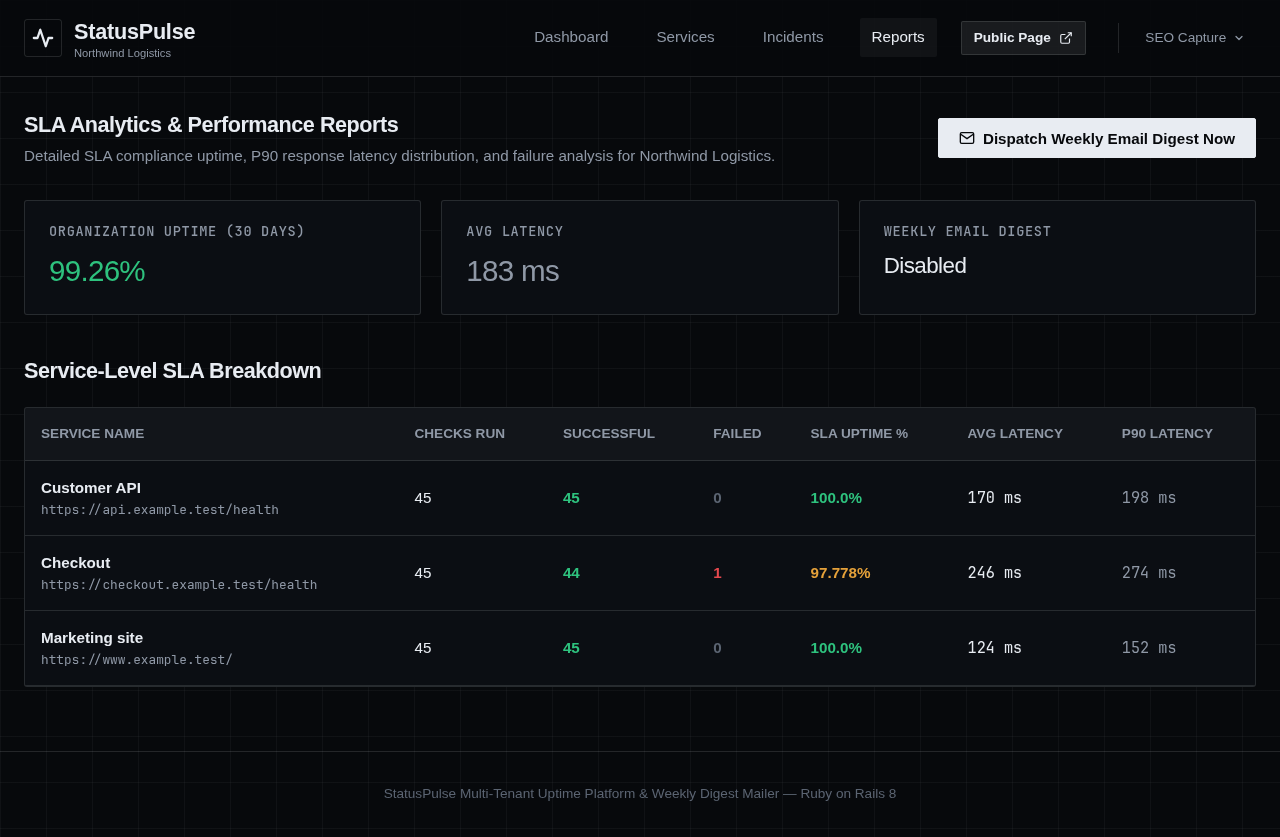
StatusPulse turns endpoint check history into reports agencies can use with clients: selectable uptime windows, successful and failed totals, average and P90 latency, plus weekly digest summaries.
Built for SLA conversations, incident reviews, and client portfolio operations.
Readable evidence
When a client asks about reliability, the useful answer is short: what was checked, how many checks passed or failed, how available it was, and how latency behaved.
Report uptime over the 7, 30, and 90-day windows that show recent health and longer-term reliability.
Show the slow tail clients feel. Averages can hide painful requests; P90 latency makes the complaint visible.
Keep successful and failed check counts beside the uptime percentage so the result has a visible denominator.
Report output
Weekly digest
Every workspace can send its team a weekly SLA summary. That keeps client stakeholders informed before a renewal call, monthly review, or outage question forces the report to be assembled by hand.
Reports follow the same client boundary as endpoints, users, incidents, and status pages.
Each report starts from the services the workspace actually monitors, not a generic dashboard export.
Reports read the workspace’s retained check logs, keeping calculated uptime and latency tied to recorded requests.
Create one workspace, add the first endpoint, and let reports accumulate from real checks.
Create a workspace